Timber design software for businesses: plan timber structures as a team
HolzBau 3D is a 3D planner in the browser for businesses that plan timber structures for their clients: carport, patio roof, garden building, pergola, canopy or roof. With the business licence everyone in the team gets Premium – with their own account.
To book you sign in; creating an account is free. Create an account
- In the browser, nothing to install
- Book 2 to 19 seats online
- 10% off from 5 seats
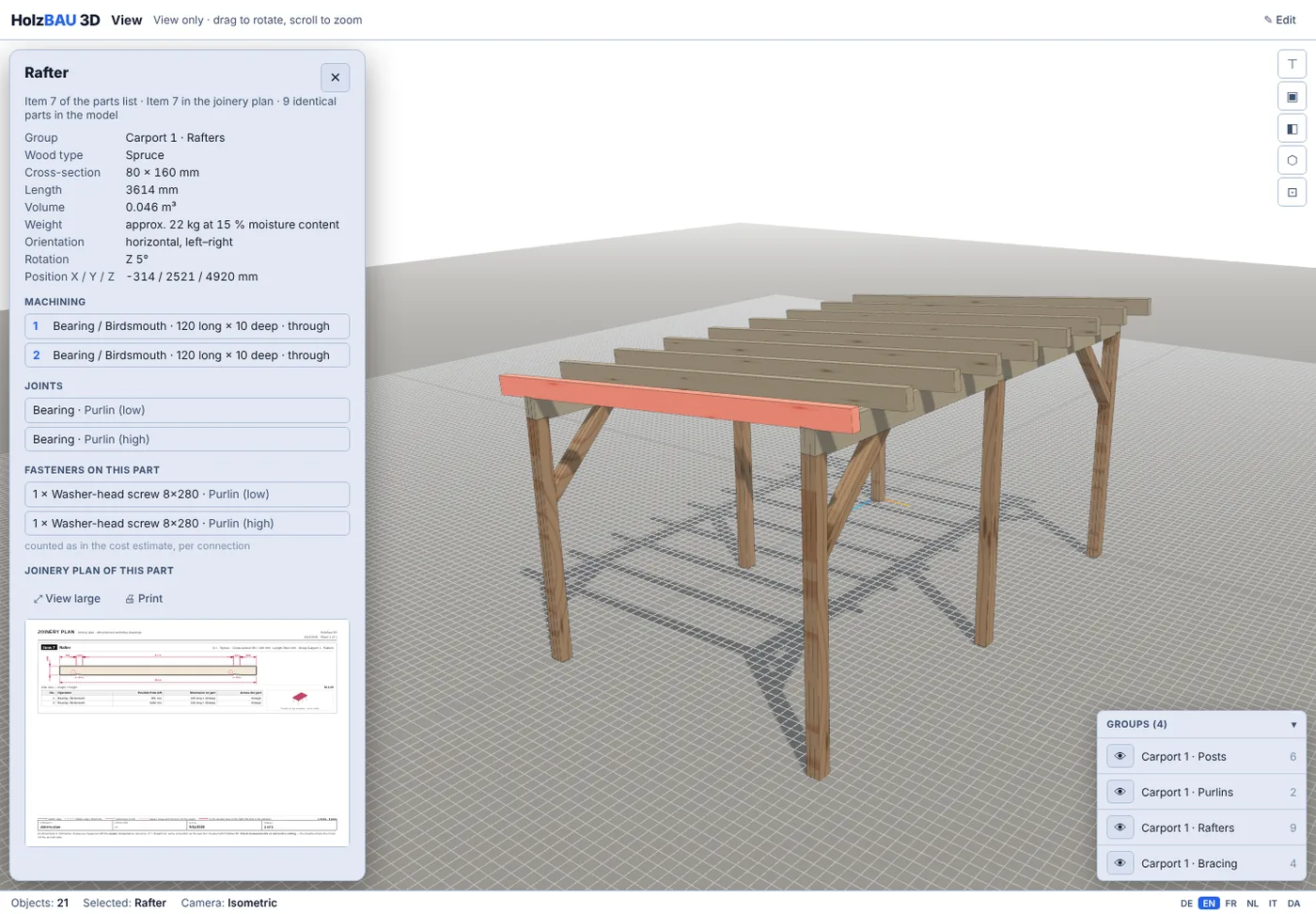
For businesses that plan timber for their clients
HolzBau 3D is aimed at businesses that want to show, cost and cut a timber structure before it is built.
Carpentry and timber construction
Plan a carport, canopy, patio roof or roof frame in advance, show it to the client in 3D and take the parts list and workshop drawings to the workshop.
Gardening and landscaping
Plan a pergola, patio cover, timber deck or garden building from the dimensions on site – with a parts list for ordering the timber.
Joinery and cabinetmaking
Plan outdoor timber structures and cut panels: cutting plan, panel cutting, DXF export and CNC milling plan for panels.
Suppliers of carports and garden buildings
The client’s dimensions become a structure with a plan – for a carport even when no corner is square.
What your team does with Premium
Every seat of the business licence is a full Premium access. This is included:
Templates from dimensions
Carport, pergola, garden shed, patio roof, canopy and roof shapes: enter the dimensions and the complete structure is generated – purlins on the posts, rafters with a birdsmouth, knee braces for bracing.
Parts list and cost estimate
The parts list is generated automatically and can be exported as CSV. The cost estimate prices the timber with your prices per timber type, plus connectors and screws with types and quantities.
Workshop drawings
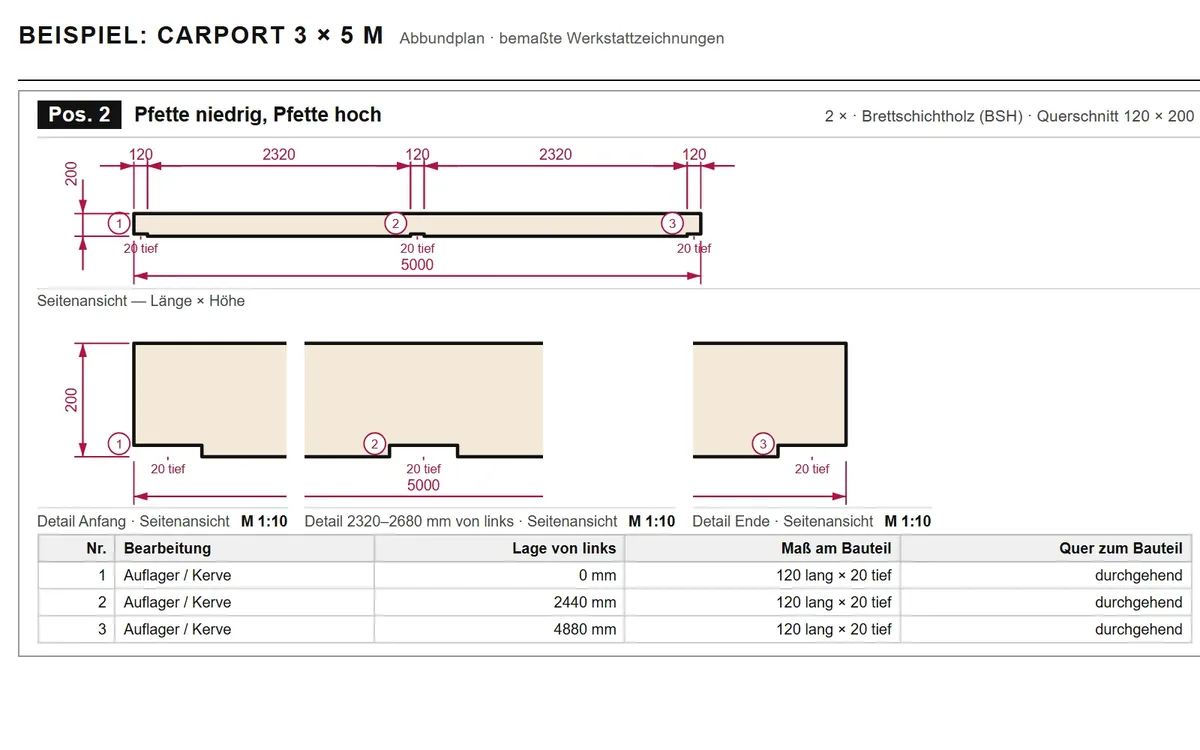
A dimensioned workshop drawing with item number for every part that is sawn, notched or routed – the sheet that goes to the saw.
Plan as PDF in 6 languages
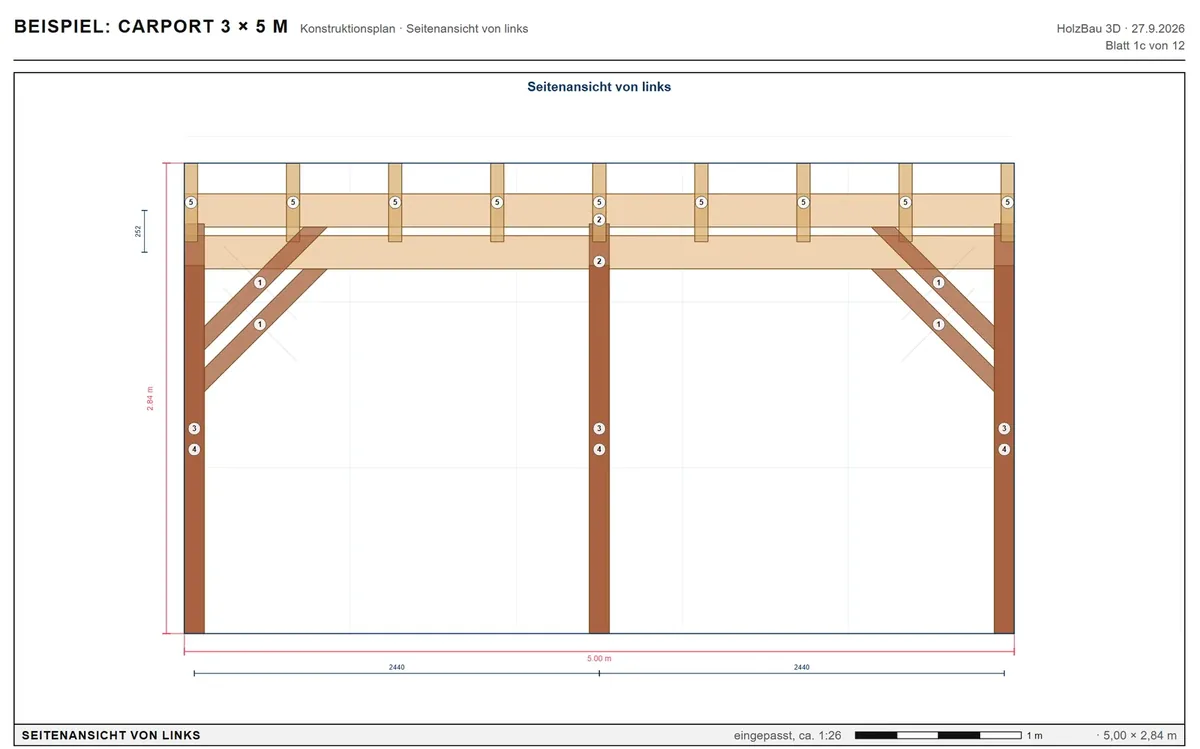
You print elevations, section, parts list and workshop drawings at true scale or save them as PDF – in the language in which you use the planner.
View link for the client
The client opens the model in the browser, rotates it and clicks parts without being able to change anything. The link is valid for 7 days and only for the email addresses you allow; access works with a code sent by email.
Share projects in the team
For each project you decide which colleague may edit it or only view it. While someone is working on it, the others can only view it.
What gets printed in the end
The example plan shows a carport the way the planner prints it: plan and workshop drawings on 17 sheets.
How the business licence works
One account buys the seats and invites the colleagues by email – one subscription instead of many single ones.
- Online you book 2 to 19 seats, monthly or yearly. Each seat costs the price of the Premium subscription: €9.99 a month or €99.99 a year.
- From 5 seats there is 10% off every invoice, as long as the licence has at least 5 seats.
- You hand out the seats under “My team” using the person’s email address. The invitation is valid for 14 days and is accepted with the account under exactly this address.
- Everyone works with their own account, password and projects. You take one seat yourself.
- You can take a seat back at any time. The person then loses Premium immediately, their account and projects stay; you can hand out the seat again after 30 days.
- More seats apply immediately and are charged pro rata, fewer seats apply from the next renewal. You can cancel at any time to the end of the paid period.
- The business licence is for businesses only. You enter your company name and VAT number for the invoice at checkout.
From 20 seats please write to us at info@holzbau3d.app.
What the business licence costs
| Seats | monthly | yearly | Discount |
|---|---|---|---|
| 2 seats | €19.98 a month | €199.98 a year | no discount |
| 4 seats | €39.96 a month | €399.96 a year | no discount |
| 5 seats | €44.96 a month | €449.96 a year | 10% |
| 10 seats | €89.91 a month | €899.91 a year | 10% |
| 19 seats | €170.83 a month | €1,709.83 a year | 10% |
All prices are final prices including statutory VAT. There are no further costs. View all plans ›
How your team gets started
- Create an account or sign inThe account that buys the licence manages the seats later.
- Choose seats and termOn the subscription page at the business licence: number of seats, monthly or yearly, confirm that you buy as a business, and pay.
- Invite colleaguesUnder “My team” you enter the email addresses; each person receives a personal link.
- Get goingWhoever accepts the invitation has Premium – in their own account.
What HolzBau 3D is not
So you know where you stand before you book seats.
Preliminary design, not structural analysis
HolzBau 3D does not check whether a structure carries its loads. Stability is a matter for a structural engineer.
Not professional timber frame CAD, not a program for joinery machines
The workshop drawings are dimensioned drawings for printing. There is no data transfer to beam-processing machines.
Planning is done on a large screen
The planner runs on a PC, laptop or tablet. On a smartphone you can view saved projects once signed in.
Frequently asked questions from businesses
What does HolzBau 3D cost for 5 employees?
For 5 seats you pay €44.96 a month or €449.96 a year. Each seat costs the price of the Premium subscription (€9.99 a month or €99.99 a year); from 5 seats there is 10% off every invoice. For 2 seats it is €19.98 a month or €199.98 a year.
Can every employee have their own account?
Yes. Everyone uses their own account with their own password and projects. Under “My team” you enter their email address; they receive an invitation and accept it with the account under exactly this address. Passing on login details is not allowed.
Can we share projects with each other?
Yes. In the planner everyone decides for their own projects which colleague in the team may edit them or only view them; without sharing, nobody sees them. While someone is working on a project, the others can only view it.
Is there an invoice with company name and VAT number?
Yes. You enter your company name and VAT number for the invoice at checkout. The business licence is for businesses only; you confirm this when you buy.
What happens when an employee leaves the business?
You take their seat back under “My team”. The person then loses Premium immediately; their account and projects stay with them. You can hand out the seat again after 30 days.
Do we have to install anything?
No. HolzBau 3D runs in the browser on a PC, laptop or tablet, with nothing to install. On a smartphone you can view saved projects once signed in; planning is done on a larger screen.
Does HolzBau 3D replace our CAD or joinery software?
No. HolzBau 3D is made for preliminary design: the structure in 3D, parts list, cost estimate, plan and workshop drawings as dimensioned drawings for printing. There is no data transfer to beam-processing machines, and it replaces neither professional timber frame CAD nor a structural calculation.
Can we change the number of seats later?
Yes. Online 2 to 19 seats are possible. More seats apply immediately and are charged pro rata; fewer seats apply from the next renewal. From 20 seats you send us an email at [email protected].
Try it first, then bring in the team
The demo runs in the browser, without signing in. You book the business licence on the subscription page.